How to Set up a Call Center? | Call Center Setup Requirements
June 13, 2024
10 mins


Contents
Technological advancements have made communication incredibly accessible, making it easier for businesses to connect with their leads and potential customers. This accessibility also presents a host of options for companies to improve their telesales campaigns, and one of those options is setting up a dedicated call center. This might seem like a big step for a business, but we present a step-by-step breakdown of approaching this dilemma when streamlining your telesales strategy.
Different companies require different types of call center setups, encompassing a variety of choices from a virtual call center to an outbound call center setup. Depending upon your needs, choosing the proper setup for your business is essential to generating a substantial ROI and improved customer satisfaction.
Whether through traditional phone calls, emails, chatbots, or social media platforms, the avenues for engagement are plentiful. This presents numerous opportunities for businesses to reach their target audience and convert leads into loyal customers.
It's no surprise that call centers are becoming more prevalent. However, it requires time and effort to set up a call center.
Let’s learn more about how to establish a call center setup.

What is a Call Center Setup?
A call center setup is a centralized department or office where customer calls are managed. Organizations utilize it to handle customer inquiries, provide support, and manage outbound calls for purposes such as telemarketing, sales, and surveys, with the assistance of agents. Call center setups are widely employed to improve customer service, increase efficiency, and enhance satisfaction by offering an exclusive channel for communication between the organization and its customers.
Role of Call Center Setup Software
Despite the emergence of omnichannel communication, the telephone remains vital for businesses to connect with customers. To optimize this process, they often turn to call center software.
Call center setup software is a comprehensive system for efficiently managing inbound and outbound calls. Equipped with various features, it aids agents in handling calls, thereby streamlining their tasks effectively. This software helps enhance the quality of customer interactions by leveraging advanced features like CRM Integration, predictive dialing, and personalized call scripts. Equipped with advanced compliance management tools, a call center setup software ensures that businesses remain industry-compliant and that customer data is in safe hands.
Moreover, with the advent of cloud-based solutions, businesses can seamlessly track analytics and KPIs, empowering them to make informed, data-driven decisions.
How Do You Set Up a Call Center in India?
Setting up a call center in 2024 is simpler than you think, especially with our clear roadmap. With just six steps, you can establish a call center that's efficient, scalable, and dedicated to delivering exceptional customer service.
1. Know Your Call Center Setup Goals
Before starting a call center setup, it's crucial to establish clear goals. A call center serves various purposes, such as customer service, sales, or technical support. Therefore, it's essential to deeply consider the purpose of your call center setup and set specific, achievable goals. These goals will be the foundation for your entire call center strategy, ensuring smooth scalability. Thus, choosing suitable targets is essential.
To begin this process, start by answering a few questions:
- What do you aim to achieve with your call center?
- How many staff members will you need to hire to meet your objectives?
- How much of the budget will be allocated for the setup and ongoing operations?
- What processes and systems must be implemented to support your goals effectively?
- Which Key Performance Indicators (KPIs) will you use to measure success and track progress?
By carefully considering these questions and establishing clear, measurable goals, you can lay a solid foundation for your call center's success.
2. Allocation of Budget For Setting Up a Call Center
Allocating a proper budget is another crucial aspect, as overspending on one activity could strain your finances. Setting aside a budget while considering both initial investments and recurring expenses is essential, which are equally important.
In setting up a call center, total costs must be allocated for various purposes, including hardware, software, services procurement, and employee salaries. By carefully budgeting for these items, you can ensure financial stability and sustainability for your virtual call center setup operation.
Let's take a closer look at some essential budget requirements:
- Initial Investments
- Licensing Costs
- Technology and Infrastructure Expenses
- Software Licenses
3. Decide Your Call Center Setup Type
Inbound call centers are run by customer support teams that receive incoming customer calls and are dedicated to solving customer issues regarding your product or service. This type of call center is ideal for :
- Product support
- Payment and order processing
- Renewal inquiries
Outbound call centers are run by the sales team that makes outgoing calls to reach out to people to sell their products, increase their sales rate, and collect market data. This type of call center is ideal for:
- Appointment setting
- Telemarketing
- Market research
Virtual call centers do not have any physical facilities. The team members work remotely from anywhere around the world. They only need a stable internet connection and a good call center setup software. Some benefits of a virtual call center are:
- Hiring the most qualified candidates from around the world.
- Providing services for 24×7.
- It saves you money.
In-house call centers provide physical facilities where employees manually make or receive calls. It is a setup with the proper equipment, and all the team members are available on-site. Some benefits of in-house call centers are:
- Fast in-person conversations between employees
- Easy training
- Smooth operations
4. Build a Team of Telecallers & Agents
Building a solid team of employees and call center agents is the backbone of any business. They serve as the primary interface between the company and its customers. Businesses need a diverse team of individuals who can handle various call center operations efficiently, as telesales, at its core, is a people-centric domain that demands the best human resources you can find in the market.
However, call center setups often need to pay more attention to the gravity of hiring the right people, which can lead to costly mistakes in the long run. With high attrition rates in the industry, it becomes paramount for businesses to select and train their call center staff carefully.
Recruiting individuals with the right qualifications and skills is crucial to building a robust call center team. Thorough screening and assessments, including mock calls and analysis of soft skills, are essential steps in this process. Furthermore, you need to set clear KPIs and expectations for these agents, regularly communicate these goals with them, and provide feedback when needed. When call center agents perform well, setting up a rewards and acknowledgment system also becomes necessary to encourage them to stay motivated and driven toward their targets.
By prioritizing the hiring and training of agents skilled in customer service and possessing deep knowledge of your products or services, you establish a solid team against customer queries and ensure smooth operations.
Here are some essential soft and hard skills that agents should possess:
|
Soft Skills: |
Hard Skills: |
|
Effective communication |
Product or service knowledge |
|
Active listening |
Proficiency in relevant software and tools |
|
Empathy and patience |
Typing speed and accuracy |
|
Problem-solving abilities |
Multitasking abilities |
|
Adaptability and flexibility |
Time management |
By prioritizing these skills during the hiring process, businesses can build a competent and resilient call center team capable of delivering exceptional customer service and driving overall success.
5. Provide Training To Employees
You'll agree that hiring isn't a one-stop solution. Regular training and upskilling sessions are essential to keep employees updated and engaged. By offering ongoing training and support to your agents, you ensure they remain motivated toward their goals. This helps polish their skills and fosters enthusiasm for tackling new challenges head-on.
6. Select the Right Call Center Setup Software
Now that everything is done, the last step is to have the right software to streamline call center agents' tasks.
As businesses seek to enhance customer interactions, selecting the right call center software becomes paramount. These cloud-based call center solutions offer a unified platform, consolidating customer communications and streamlining operations. Call center software streamlines business performance and has various features such as API integration, omnichannel support, an interactive voice response system, and an analytics dashboard.
Here are a few essential call center software features that your call center setup must have:
- Omni-Channel Support: Ensure seamless communication across multiple channels for a cohesive customer experience.
- Interactive Voice Response (IVR): Automate call routing and provide self-service options through an IVR system.
- API Integrations: Integrate with other business tools to facilitate data exchange and workflow automation.
- Analytics Dashboard: Track critical metrics and gain insights into call center performance and customer interactions.
- Call Recording and Monitoring: Ensure quality assurance, compliance, and agent training through call recording and monitoring capabilities.
- Call Transfer and Routing: Facilitate efficient call routing to promptly connect callers with the appropriate agent or department.
Call Center Phone Systems: Find the Right Virtual Solution
How to Set Up a Virtual Call Center?
Virtual call centers operate similarly to traditional ones but without a physical location. They leverage virtual call center software, which utilizes contact center technology to enhance business performance and increase customer satisfaction. These setups enable agents to access data from cloud-based call centers without any hefty expenditure and physical locations, offering improved flexibility and scalability.
Consequently, virtual contact centers have become the favored choice for businesses and tiny enterprises owing to their cost-effectiveness, flexibility, and access to a global talent pool. SquadStack's plug-and-play model makes it easy for them to set up their telecalling campaigns using virtual call center software.
How Does SquadStack's PNP Model Help Establish Virtual Call Centers in India?
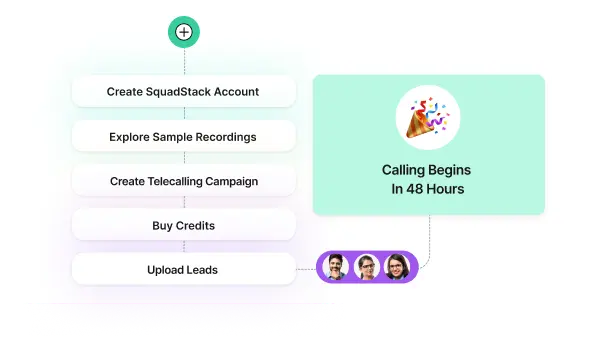
SquadStack's plug-and-play (PNP) model is the best solution for establishing virtual call centers in India. With SquadStack's PNP option, small businesses can swiftly set up accounts within 15 minutes and kick-start outbound telecalling campaigns within 48 hours.
This model is validated by over 100 brands, including iACE, which saw a remarkable 200% enrollment boost and a sevenfold increase in conversion rates, showing its efficacy.
Check out how to achieve a 200% Enrollment Boost with SquadStack Plug-and-Play Solution.
Within SquadStack's virtual contact center software, businesses benefit from various features:
- Selection from a range of campaign templates tailored to their specific needs.
- Easy customization of telecalling scripts through a drag-and-drop script builder.
- Access to an analytics dashboard that furnishes insights into live campaign performance, facilitating data-driven decisions.
- Seamless analysis of lead-level outcomes, call audits, and feedback sharing, ensuring continuous improvement and optimization of campaigns.
What are Various Call Center Setup Requirements For a Remote Telecalling Team
With the rapid development in technology, it has become crucial for contact centers to stay updated with the latest technologies and integrations. Leading virtual contact center providers like SquadStack ensure that all call center setup requirements are provided in their solutions. Let's take a closer look at them:
Lead Management Technology Stack
SquadStack’s virtual call center setup empowers businesses to manage their leads meticulously, ensuring they aren't duplicated or unintentionally contacted if on the Do Not Disturb (DND) list.
Our system prioritizes leads based on various criteria, aiming for swift Turnaround Time (TAT). Through our intuitive workflow builder, leads seamlessly flow through different channels or touchpoints, fostering meaningful customer interactions.
Read more: Lead Management and Omnichannel Outreach.

Omnichannel Outreach
With our call center setup solution, businesses gain access to a customizable omnichannel outreach system. This feature enables agents to engage with leads across multiple platforms, such as WhatsApp, email, SMS, and IVR. By leveraging this capability, businesses can track lead progression and pinpoint potential drop-off points, ensuring a better approach to customer engagement.

Call Quality Analysis Setup
SquadStack combines the best technology with human expertise to ensure the best quality analysis. Our solution surpasses industry standards by conducting quality monitoring on up to 12% of calls across 23 parameters. These highly flexible parameters allow businesses to customize them according to their specific needs and preferences.

Telecalling App with Guided Script and Onboarding Facility for Remote Telecallers
Our guided telecalling app and web application are invaluable tools for agents, providing them with comprehensive scripts covering everything from initial greetings to closing remarks. Agents can easily capture key details and schedule follow-ups with leads directly within the app. All the collected information is then seamlessly integrated into the customer’s CRM system, ensuring streamlined data management.

Check this out: Telecalling Excellence: SquadStack's Intuitive Agent Interface
Analytics Dashboard
Our analytics dashboard gives businesses a comprehensive overview of their campaign performance. This user-friendly interface provides valuable insights into call quality scores, key performance indicators (KPIs), campaign performance metrics, and performance-based categorization of callers. With actionable insights, businesses can make informed, data-driven decisions to drive continuous improvement and success.
.webp)
Check out how SquadStack helped Udaan with the best-in-class analytics dashboard.
Why Choose SquadStack for a Call Center Setup?
Leading companies like Delhivery and Udaan are opting for SquadStack’s virtual call center services to enhance campaign performance.
SquadStack’s fully integrated solution provides comprehensive assistance to businesses looking to outsource their telecalling campaigns. It offers top-notch connectivity, customizable omnichannel outreach, analytics dashboards, and skilled telecallers.
SquadStack operates on a success-based pricing model, where businesses only pay for connected and productive minutes. Our solution combines cutting-edge technology with human expertise to increase NPS and CSAT and reduce CAC.

FAQ's
Which industries require call center desk setup?

Call centers are crucial across retail, telecommunications, banking, healthcare, travel, technology, insurance, and utilities.
What are the benefits of call center setup for businesses?
Implementing a call center setup improves customer service, increases efficiency, enhances satisfaction, enables upselling, provides valuable insights, streamlines communication, and facilitates performance tracking.
What call center setup software is essential?
Essential software includes CRM for managing interactions, call center software for handling calls and analytics, VoIP systems for communication, knowledge management tools, and quality monitoring software.
What metrics help determine the efficiency of setting up a call center?
The essential metrics include Average Handling Time, First Call Resolution, Customer Satisfaction and Net Promoter Score, Service Level, Agent Utilization and Occupancy, Call Abandonment Rate, and Conversion Rate.
What is needed to set up a call center?
The requirements needed to set up a call center include physical or virtual infrastructure, necessary hardware, call center software, recruitment & training programs, operational processes, ongoing support, and maintenance.
Book a Consultation Now

Book a Consultation Now